
PhysioMind Sign inSign up
WhatsApp
For physiotherapy students and clinicians

Assess. Learn. Connect.

Ortho, Neuro and Cardio assessments with info cards and AI suggestions, 100+ special tests, posture analysis from photos, a Case Simulator, and PhysioFeed for jobs, news and evidence.

* No payment needed. 14 days of the whole app, then the Free plan.

1 of 9Ortho AssessmentFill in the assessment region by region. Tap the picture beside a muscle and its info card opens, with a photo of how to test it.

Ortho · Neuro · Cardio · AI ObjectiveInfo cards · Special tests · Case SimulatorPosture analysis · PhysioFeed · PDF reports

Jump to: AI assessment Info cards PhysioFeed Learn Practical skills Posture All features Pricing

  1. Fill in the assessment region by region. Tap the picture beside a muscle and its info card opens, with a photo of how to test it.

  2. Tap the picture beside a reflex: how to perform it, the 0–4+ grading and how to interpret it.

  3. Tap the picture beside a vital sign to see how to take it, the normal range and how to read it.

  4. Describe the case and tap Analyze: ranked condition matches, with what to observe, measure and test. You review everything.

  5. Take or upload four photos, check the points and see the result in plain words. Make a PDF report.

  6. More than 100 orthopaedic tests with photos, and the sensitivity and specificity of each one.

  7. Choose a patient and work through the case. Pick the next step and see why.

  8. Opportunities, news, case discussion, people and an evidence library, all inside the app.

  9. Practical Skills with photos and how-to cards: ROM, MMT, Special Tests, Neurological, Outcome Measures and Cardio & Respiratory.

AI AI Objective

Let AI suggest what to examine.

Describe the case and tap Analyze. PhysioMind ranks the likely conditions and suggests what to observe, measure and test. You review everything.

Step 1 of 8Condition previewsBefore you analyze, preview likely conditions. More unlock when you analyze your case.
  1. Before you analyze, preview likely conditions. More unlock when you analyze your case.

  2. Tap Analyze Case for ranked condition matches, with the supporting signs from your subjective notes.

  3. Findings to look for, each with a photo, a What to observe note and a Positive button.

  4. Tap What to observe on a finding to see how to check it.

  5. Active, passive and resisted movements, with the normal range and a photo.

  6. Muscle strength grading 0 to 5, muscle by muscle, with the nerve and root.

  7. Each test shows the structure it examines, with sensitivity and specificity. You mark the result.

  8. Functional checks with a Helps find note, so you see why each one is suggested.

Needs a free account. Analyze Case uses 1 AI credit; every new account starts with 50. Screens show a test case.

i Info cards

Assess the patient. Learn as you go.

Open an Ortho, Neuro or Cardio assessment. Tap the info icon, or the picture, next to a test and its info card opens: how to perform it, what to record and how to interpret it. You never leave the form.

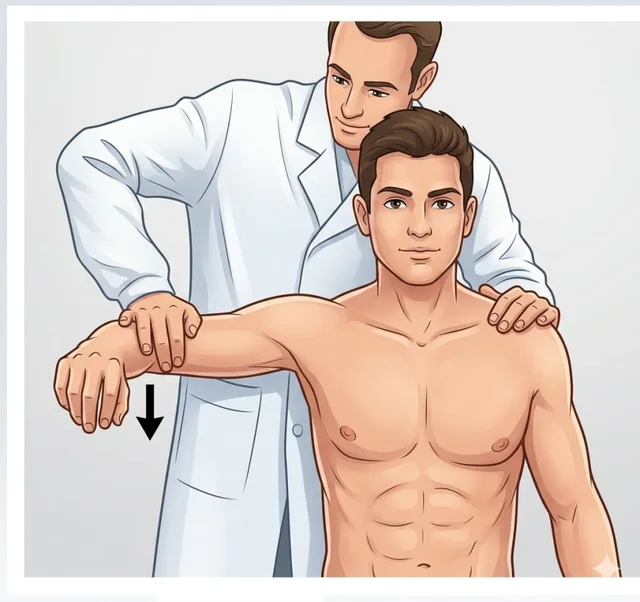
Ortho Assessment · MMTTap the picture beside a muscle. The info card opens with a photo of how to test it, the action, the nerve and the testing steps.
  • Ortho Assessment · MMTTap the picture beside a muscle. The info card opens with a photo of how to test it, the action, the nerve and the testing steps.
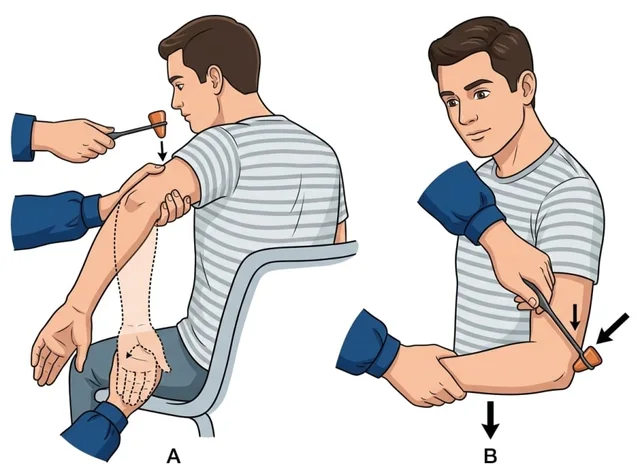
  • Neuro Assessment · Tone / ReflexesTap the picture beside a reflex. The info card shows how to perform it, the 0–4+ grading and how to interpret it.
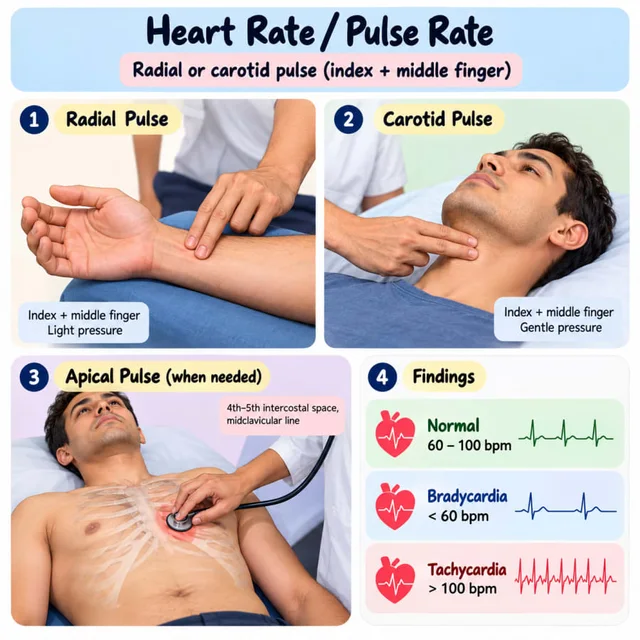
  • Cardio Assessment · Baseline VitalsTap the picture beside a vital sign. The info card shows how to take it with pictures, the normal range and how to interpret it.
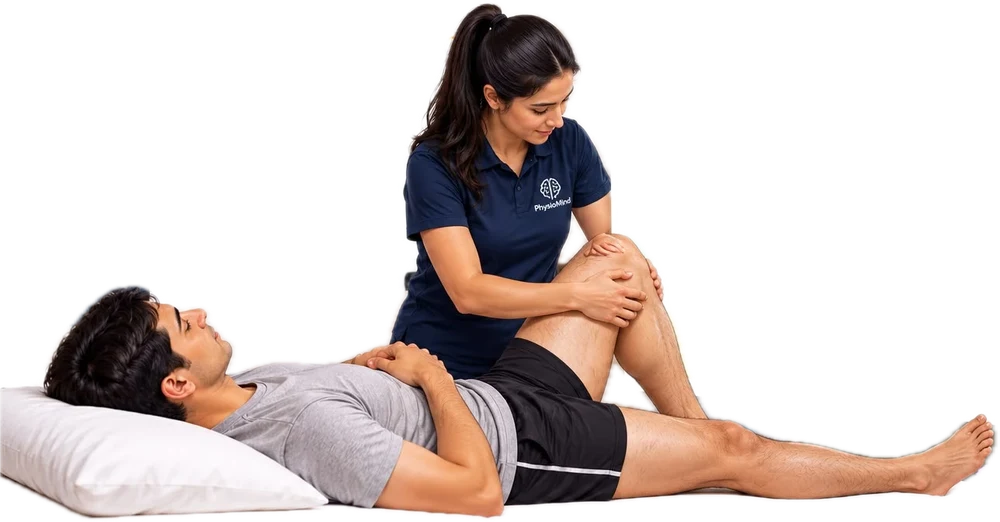
A physiotherapist assessing a patient's knee on a treatment couch
Photo from the info card: testing the middle deltoidPicture from the info card: the triceps reflexPicture from the info card: heart rate and pulse rate

Screens are from the live app.

F PhysioFeed

Connect with the profession.

Case discussion, opportunities, news, people and an evidence library, all inside the app.

Step 1 of 3OpportunityJobs, internships, workshops and collaborations for physiotherapists.
  1. Jobs, internships, workshops and collaborations for physiotherapists.

  2. A daily briefing for physiotherapists: jobs, conferences and rules.

  3. Search PubMed and Europe PMC from inside the app, with links to PEDro and Cochrane.

A physiotherapist looking at her phone

Listings and posts in the screenshots are demo content.

L Learn

Learn by doing.

Practical skills with photos and how-to cards, and a Case Simulator where you meet the patient, pick the next step and see why.

Step 1 of 4LearnPractical Skills and the Case Simulator, with more coming soon.
  1. Practical Skills and the Case Simulator, with more coming soon.

  2. ROM, MMT, Special Tests, Neurological, Outcome Measures and Cardio & Respiratory.

  3. Choose a patient and work through the case.

  4. Meet the patient, then answer step by step, with the reasons explained.

A physiotherapy student studying

Test, BPT and Exam Ready are coming soon.

P Practical skills

Learn the technique.

Range of motion, manual muscle testing and 100+ special tests, each with photos that show the technique.

Step 1 of 3Range of MotionHow to measure each movement, with the normal range and a photo that shows the technique.
  1. How to measure each movement, with the normal range and a photo that shows the technique.

  2. Muscle by muscle: the action, the nerve and the root, with a photo of how to test it.

  3. The structure each test examines, with its sensitivity and specificity, and a photo.

A physiotherapist looking at her phone

Screens are from the live app.

P Posture Analysis

Check posture from photos.

Take or upload four photos of a patient. The AI places the points, you check them, and the result explains each finding in plain words. Slide to see each step.

Step 1 of 8Four photosTake a photo with the camera, or upload one, for each view: front, back, left side and right side. Choose the patient now or later.
  1. Take a photo with the camera, or upload one, for each view: front, back, left side and right side. Choose the patient now or later.

  2. The AI places the points on the photo. Tap a body part to see its points and use the grid to check the lines. Drag any point to fix it.

  3. Switch between the front, back, left and right photos at the top, and check the points on each one.

  4. On a side photo, tap Results to see the extra points you can add, such as the spine, pelvis and C7, and what each one gives.

  5. See the status, the four views and each finding at a glance.

  6. Open a view to see a body map and each measurement against its normal range.

  7. Why explains a finding in simple words, with more detail and tests to consider.

  8. Make a PDF report with the photos, the findings in plain words and the status of each body part. The faces are hidden.

A posture screening and education tool, not a medical diagnosis. Screens use the app's example photos.

All features

Everything in one app

Every card is a real screen from PhysioMind.

Info Cards

learn while you fill in
  • Every assessment has info cards: Ortho, Neuro, Cardio & Respiratory and AI Objective
  • Tap one while you fill in, then carry on. No need to leave the screen
  • Neuro and Cardio & Respiratory: Perform, record and Interpret, on one card per test
  • Ortho: the info button on a movement, muscle or test shows a photo and how to do it
  • AI Objective: photos, What to observe notes and Helps find cards on the suggested testsNeeds an account
Ortho Assessment

13 body regions
  • Outpatient, Inpatient (IPD) and Post-operative pathways
  • 21 steps in a General assessment, from Demographics to Final Review
  • Info cards on movements, muscles and tests
  • Body Chart for pain, tingling, numbness, burning, stiffness, weakness, radiation and swelling
  • Red Flag Screen
  • Outcome Measures suggested for the region you pick
  • Diagnosis, Problem List, Care Plan Goals and Treatment
  • Say it your way: type the complaint in English, Hinglish or Hindi and tap the suggested answers

Neuro Assessment

with info cards
  • Condition templates such as Stroke, Parkinson's, TBI, Spinal Cord Injury and Guillain-Barré
  • Info cards on the tests: how to perform, record and interpret
  • Full neuro exam, outcome measures, summary and review

Cardio & Respiratory

cardio, respiratory or both
  • Choose cardiovascular, respiratory or combined
  • Info cards on the tests: how to perform, what to record and how to interpret
  • Vitals, history and examination
  • Baseline readings, functional capacity and summary

AI Objective

needs an account
  • Describe the patient in your own words and the Subjective form is filled in for you to check
  • Ranked condition matches
  • Suggested observations, ROM, MMT, special tests and functional checks, with photos, What to observe notes and Helps find cards
  • You review and correct everything
  • Analyze Case uses 1 AI credit; every new account starts with 50

Posture Analysis

from four photos
  • Take or upload four photos: front, back, left side and right side
  • The AI places the points on each photo, and you can drag any point to fix it
  • Side views can add more points, such as the spine, pelvis and C7
  • A result with a status, a body map and every measurement against its normal range
  • Why: each finding in simple words, with tests to consider
  • PDF report with the faces hidden
  • Save to a patient and open an earlier visit to compare
  • A screening and education tool, not a diagnosis

Special Tests

100+ with photos
  • More than 100 orthopaedic tests, grouped by region
  • Mark each Positive or Negative and add notes
  • Sensitivity and specificity shown for each test

Practical Skills

ROM, MMT and more
  • Range of Motion: the normal range and a photo of the technique
  • Manual Muscle Testing: the action, nerve and root, with a testing photo
  • Neurological, Outcome Measures and Cardio & Respiratory
  • Functional Movement, Kinetic Chain and CPA
  • Search across topics, skills and tests

Reports

PDF in one tap
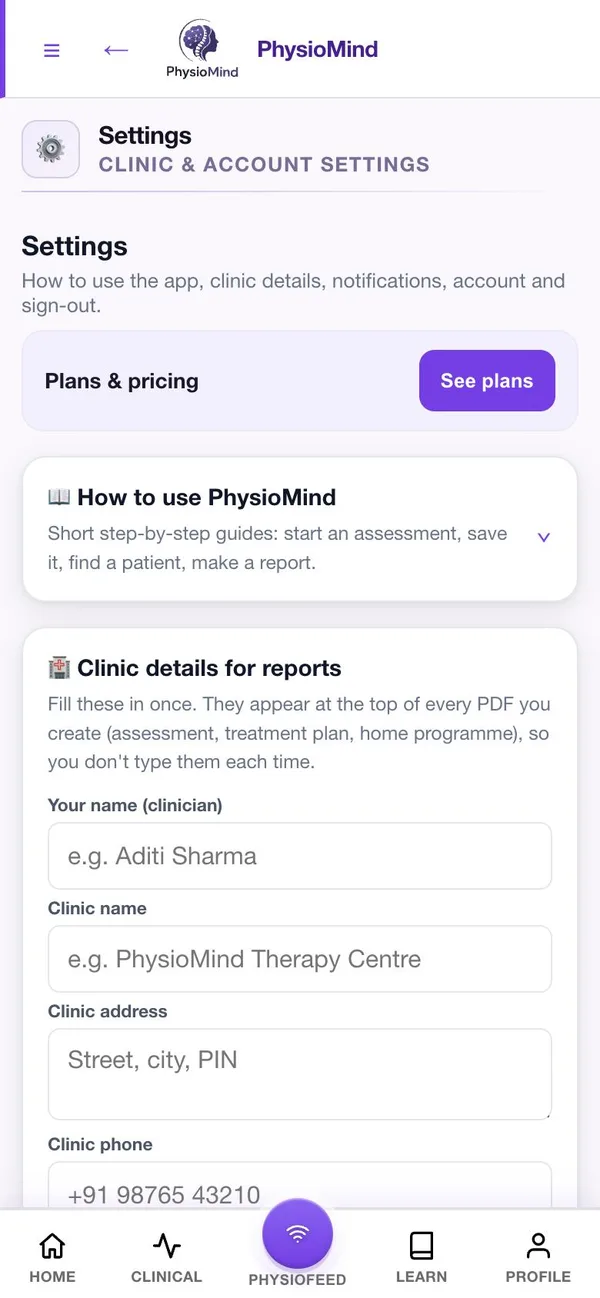
  • Generate PDF Report with your name, clinic, address and phone at the top
  • Copy assessment as text
  • Save as Template for the next patient
  • Share as Clinical Discussion: only the sections you tick, never the patient's nameNeeds an account

Patients

sessions and plans
  • Today's patients, with search, filters, import, export and backup
  • Patient profile: overview, assessment, care plan, sessions, home programme and documents
  • Follow-up treatment sessions in about a minute
  • Medical Records
  • A permission check for each patient, and two sample patients to practise on

Exercise Library

and home programme
  • Exercise Library
  • Home Exercise Programme to assign to a patient
  • Evidence-based protocols
  • My Clinic Protocol: save your own (syncs across devices with an account)

Case Simulator

pick the next step
  • Meet the patient, pick the next step and see why
  • Knee Case 1, Shoulder Case 1 and Lumbar Case 1 are open
  • Neck Pain, Low Back Pain and Breathlessness casesComing soon
  • Test (MCQs), BPT (1st to 4th year) and Exam ReadyComing soon

PhysioFeed

your physio network
  • Feed, News and Case Discussion
  • Opportunities: jobs, internships, workshops and collaborations; post your own or apply
  • People and Messages
  • Evidence Library: search PubMed and Europe PMC, with links to PEDro and Cochrane
  • Professional profile

Works Offline

saves as you type
  • Answers save as you type
  • Keeps working without signal and uploads later
  • Add to your home screen: Safari on iPhone, Chrome on Android

Help and Privacy

tours, guides, settings
  • Guided tours and how-to guides in Settings
  • Clinic details set once and used on every report
  • Patient copies kept on the device are encrypted; you can delete your account inside the app
Launching pricing

Simple pricing

These are our launching prices. Start with the free trial, and choose a plan when you are ready.

14DAYS
FREE TRIAL

The whole app, free

Every new account gets the whole app. After the trial you stay on the Free plan, and Pro unlocks the rest.

START FREE TRIAL
FREE
₹0forever
  • Ortho Outpatient: General Assessment
  • Range of motion (ROM)
  • Special Tests
  • Save and review your assessment
Start free
PRO
₹199per month

Pay once, no auto-renewal

  • AI Objective Assessment and paragraph fill
  • Palpation, MMT, joint mobility, advanced tools
  • Diagnosis, care plan, exercise and home protocol
  • Neuro, Cardio, IPD and Post-op assessments
  • ₹199 per month Pay once, no auto-renewal
  • ₹499 per 3 months About 16% less than monthly
  • ₹899 per 6 months About 25% less than monthly
  • ₹1699 per year Best value: about 29% less than monthly
Start free trial

Online payment is not open yet. In the app, tap a plan to email us from the address you registered with, and we will switch Pro on.

Contact us

Questions about PhysioMind, Pro or getting started? Message us.

Your next step in physiotherapy learning starts here.

Create a free account and try it on your phone.

* No payment needed. Every new account gets 14 days of the whole app, then the Free plan.